Educational & Exam Preparation Resources HELLO ACADEMY

Hello Academy

Reliable educational materials, exam preparation resources, model questions, question papers, notes and learning support for Nepali students and teachers.

School Level Classroom and school examination materials Aayog TSC, PSC and other competitive exam resources Other General model sets and useful questions

Latest Educational Materials

Showing posts with label Optional-english. Show all posts

Monday, December 27, 2021

The Three Knights Davies Gilbert Poem, class 12 opt English


The Three Knights

Davies Gilbert

Davies Gilbert was born on 6 March 1767. He was the second of three children. He was a Cornish engineer, author, and politician. He worked as the president of the Royal Society. The poem "the Three Knights" was written in the appendix of his work Christmas Carols. In the poem, he had missed something after the 8th stanza. The Three Knights was a popular narrative poem and a ballade. It has some refrain (repetition of some lines in the verse) in the poem.

The three knights were coming from the west. They saw a beautiful lady on the way. She was as beautiful as the rose which was sweetly blown. The first knight who was in white dress proposed to her to give her delight in her life.  The second knight who was in green dress also proposed her to be his queen. And the third knight who was in red dress asked her if she would wed.

Then, the Lady asked the soldiers if they had asked her father, mother, brother, and sister about their proposal to her. it was not clear that who was going to marry her. They answered that they had asked her father, mother, and sister. They ware agreed to their proposal. But they didn't ask John her brother. It was because they have seen her brother far on the road where his daughter stooped (bent) low to kiss him at that time he had pierced (to make a wound) to her heart and it was started bleeding. Her servant noticed that there was bleeding on her dress and cried to the soldiers that their wife was looking pale and weak.  The wounded lady had lost her hope of life and wished to remain so far distance in the hill where she could fulfill her will. The soldiers asked her about her wishes. She answered that she would give a gallant (brave horse) steed to her father, a wedding dress to her mother, and a gold ring to her sister Anne. It was needed to wash her wedding dress because there were bloodstains in each part of that cloth. Finally, she wished to give a rope and a gallows to her brother which might be used to hang him on. And she wished to give a widower's dress and quiet life to her brother's wife.

In the poem, the soldier who is wearing red clothes was going to marry her. It means he might be involved in the act of helping her therefore his clothes are red due to her blood. He knows that her brother has made her wound. So he doesn't ask to get an agreement with her brother. Finally, she wished to give a gallant horse to her father which has saved her. The horse might be the horse of that soldier. From the story, John was not happy with the decision of his sister to marry the soldier. So he is trying to kill his own sister in his rage. The ballad tries to show the theme of family relationships, love affairs, rejection of family members, etc. 


Sunday, December 26, 2021

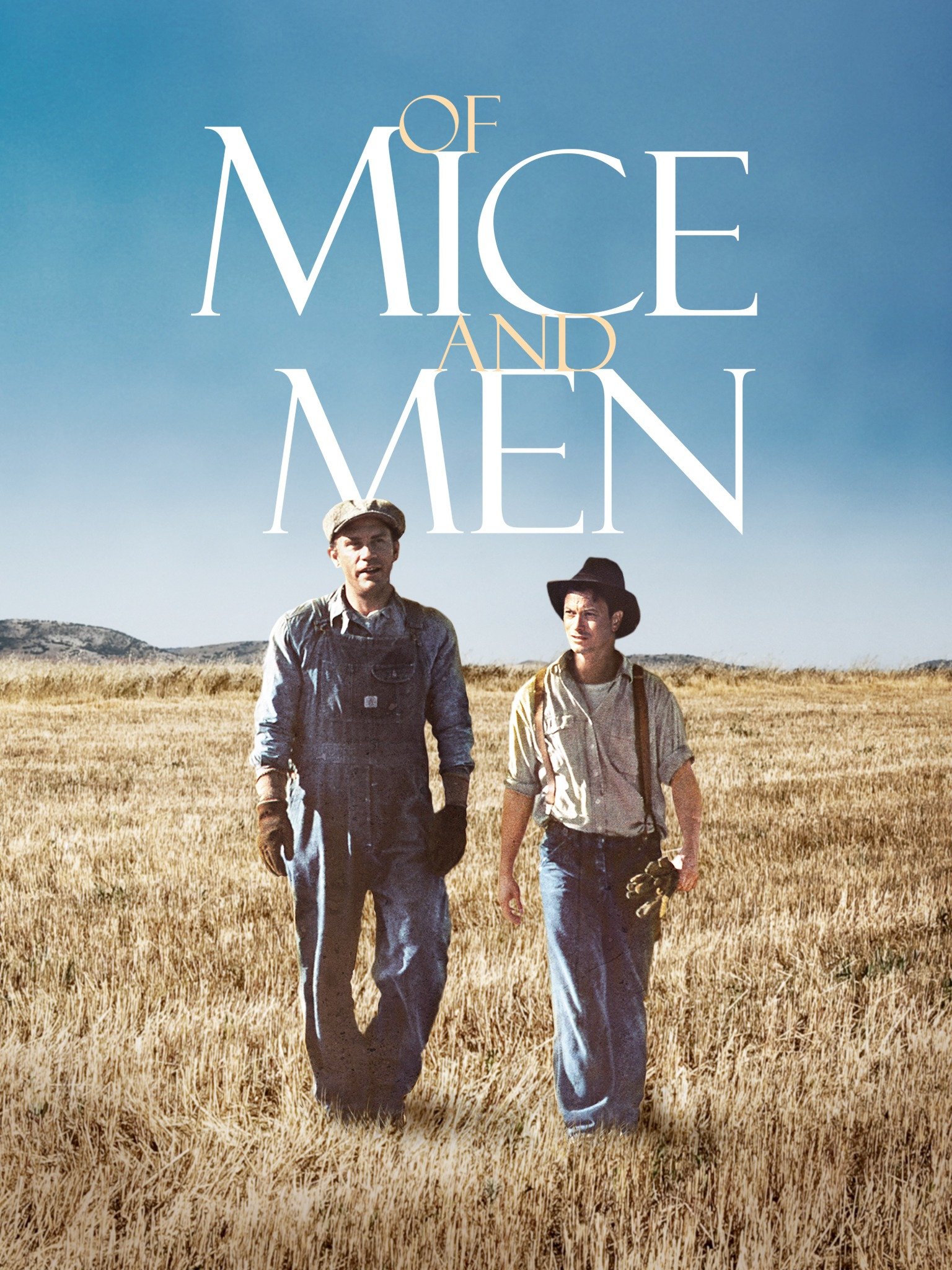
Of Mice and men novella Plot Summary by John Steinbeck class 11 opt English

Plot Summary of the Novella

Chapter One

George Milton and Lennie Small are the two main characters of the novella. They are displaced and migrated ranch workers who move from place to place in California in search of new job opportunities. The setting of the story happened a few miles south of Soledad (a coastal California city south of San Francisco) the Salinas River flows deep in close to the hillside bank of rocky Gabilan Mountain. On the sandy bank, rabbits come to the brush to sit on and drink water at night. There was a path through the forest made by the boys coming down the ranches to swim in the pool.

Two boys appeared in that silent jungle. They were dressed in denim trousers and in denim coats with brass buttons. They were wearing black shapeless hats and they are carrying tight blanket rolls slung over their shoulders.  The first man was small and quick, dark of face with restless eyes, and sharp strong features. His every part is defined: small, strong hand, slender arms, a thin and bony nose. Behind him waking his opposite a huge man, shapeless of face, with large, pale eyes, with wide sloping shoulders and he walked heavily; dragging his feet a little as a bear drags his paws. His arm didn't swing at his sides but hung loosely.

Lennie wipes his sweat hand with his forefingers and snapped the moisture off. He reached to the surface of the green pool; drank with long gulps, snoring into the water like a horse. George stepped nervously beside him and said to Lennie not to drink so much unsafe water. Lennie dabbled his big paw in the water and wiggled his fingers so the water arose in little splash rings widened across the pool to the other side, which he watches them go. George knelt beside the pol and drank from his hand with quick scoops. It was good to taste but he warns Lennie not to drink any water that doesn't run. They are walking in search of a good job on a ranch. George remembers that he would be at the gate of the ranch if the bus driver knew what George was talking about. Lennie asks George where they are going. Lennie forgets things very easily although he doesn't want to do that. He behaves like an innocent baby. George reminds him where they are going. George has to tell the same thing again and again to remind him. George tells him that they are going to Murray and Ready's who would give them work cards and a bus ticket. Lennie puts his hand into his side pocket and takes out a dead mouse. Lennie likes to touch soft things but he doesn't care about their softness. While touching that mouse he might have killed it. George took the mouse and throws to the other side among the bush. He adds that they are going to work on a ranch like the one, which they have done earlier.

The ranch where they are going to is right down there about a quarter-mile. They are going to see the boss. They will give them a work ticket and start working there. He warns Lennie not to speak any word to the boss. George threatens Lennie not to repeat the same thing that he has done in ranch weed. Lennie easily forgets things and do the same mistake again and again. It always leads George to great trouble. So George used to think that he would be happy and might have a beautiful girl with him if he didn't have a fellow like Lennie.

They can't reach their workplace and plans to stay a night in the jungle. Lennie collects some dead willow sticks to cook supper. They heat the beans and have supper there. While collecting dead sticks Lennie finds the same mouse and brings it. George becomes angry, snaps on his finger, and throws that mouse very far. Lennie starts to weep and George promises to give him a fresh mouse for a while. Lennie remembers a lady giving him the mouse. She was his aunt Clara who was died. She stopped giving them to him because he always kills them. Lennie pinched on their head with love and they dies. Lennie wishes to get the rabbit, which is not small.

George imagines his own free life if there is not Lennie with him. He could live so easy, could get a job, could do whatever he wishes, could stay in any place and would eat anything and could get a gallon of whisky, could get married and live happily. George expresses his disappointment to Lennie. Lennie gets serious and says that he would go to the hills and search for a cave to live in if George doesn't want him.  George doesn't allow him to go away because he has promised Aunt Clara that he would take care of him. In this time Lennie says politely George tells them about their plan. George tells the plan that they will work on a ranch, they will earn a lot and buy their own land, have some horses, a cow, a big vegetable patch, and rabbit hunch and chicken.

They set by the fire and have beans. George warns Lennie not to speak a word to the boss tomorrow. If Lennie speaks badly to the boss they may not get a job. George reminds Lennie not to forget this place where they are staying at night and have some beans. If Lennie gets into y trouble and feels insecure, he is requested to remain in this place and hide in the bush until George arrived at him. Then they sleep on the sand. 

Chapter Two

They reached the bunkhouse, it was a long, rectangular building, the walls were whitewashed and the floor unpainted. At about 10 o'clock in the morning a tall old man came in. the old man said that he was waiting them last night. They talked about the nature of the boss. The boss asks them about their late arrival, their name, and job experiences,  etc.  When boss asks some questions, Lennie but George answers them. Lennie remain silent as George told him. Boss wants to know if Lennie is dumb. George explains that they used to work together on a ranch, Lennie is a slow-minded person but he can follow the order and work perfectly. The boss admits them to work and sends them to the team of Slim. They get a room. There are some boxes to sit on and a table to play cards in their free time. Slim is a smart big tall skinner (skilled Mule driver) of the bunkhouse.

A young man enters the bunkhouse; a thin man with a brown face and head of tightly curled hair with brown eyes. His name is Curley – boss's son. He is pretty handy (fighting easily). He has done quite a bit in-ring and lightweight, and he is handy. He hates big guys like slim and Lennie. Therefore, everybody gets frightened of Curley. Curley knocks Lennie by his side pretending as walking. Curly wants him to dominate in the first meeting. He has married a couple of weeks ago. His wife lives in the boss's house. He has worn a glove because he wanted to make his hand soft for his wife. He doesn't have any faith in his wife. He suspects her when she talks to the men of the spaced bunkhouse. He is more suspicious to slim. After a moment Curley's wife appears in their room. She has full rouged lips and wide space eyes, red fingernails, her hair is hanging in little rolled clusters like sausage. She has worn a cotton housedress. George guesses that Curley has got married a tart woman (A prostitute woman). Curley comes to George and Lennie and scolds them not to see his wife. They don't like to work in this place but they didn't have any option. They think, to stay for few days for few dollars. George warns Lennie again not to make any trouble with Curly and his wife as he had done in a weed.

A tall man stands in the doorway. He hold a crushed Stetson hat under his arm while he combed his long, black, damp hair straight back. Like others, he wears blue jeans and a short denim jacket. He is a jerking skinner, the prince of the ranch, capable of driving ten, sixteen, even twenty mules with a single line to the leaders. He looks gentle and all stops when he speaks. His authority is so great that his word is taken on any subject, be it politics or love. He is about thirty-five or fifty. His name is Slim. He introduces himself with Lennie and George. They are working in the team of Slim. His dog has got some puppies.


A big-stomached man enters the Bunkhouse. His name was Carlson. Slim introduces George and Lennie to Carlson. Slim's dog has got nine puppies that he wants to keep only five of because the bitch couldn't feed them all. In the bunkhouse, there is an old man whose name is Candy. Candy explains about Curley and his wife, and about the bunkhouse. Candy has an old dog.  Candy is old and handicapped. He has only one hand, he is not respected in that Bunkhouse. He has worked as a Swampier (sweep the ground). He likes his old dog that was his sheepdog at a young age. It frequently enters the room that Carlson doesn't like. This dog is so old which can't eat and walk properly. It doesn't have any teeth and Candy feeds only milk. It is blind and smells very bad that they can't stand. Carlson tells him to kill it but Candy doesn't get ready.

Chapter Three

Slim and George come into the darkening bunkhouse together. They go to the card table and sat on the box. Slim feels sorry for drowning four puppies. George thanks him for drowning them otherwise Lennie would sleep with them in the barn slim compares George as bright and brilliant and Lennie as a cuckoo very slow.

Lennie has gone outside with puppies. George and Slim start to talk about Lennie. George explains that he is together with Lennie when his aunt Clara died. She told George to take care of him. George explains to Slim that he enjoys Lennie because he is dumb and it is very funny to make a joke over him. George told an event about Lennie- they were standing at the Sacramento River and told him to jump in, Lennie immediately jumped into the river and nearly drowned but later he forgot what was told him to do. George told Slim about weed. Lennie saw a girl in a red dress. He wanted to touch her dress and tries to touch her dress. She started to cry and, everybody came and accused him of trying to rape her. In fact Lennie didn't have any motive to rape her but just wanted to touch that clothes.

Lennie enters the room and George asks him about the pup. Lennie explains that they are brown and white which he likes most. Lennie is keeping the pup inside his clothes so George scolds him not to bring that pup in the room and tells him to send that pub in its nest with his mother.

It was almost dark outside old Candy the swampier has entered and his old dog follows him. Carlson also enters the bunk and tells Candy to keep the old dog outside. It doesn't have any teeth and can't walk properly. Carlson tells Candy to shoot that dog, it will be better for the dog and all. Firstly Candy doesn't like to shoot it because he loves it much and keeping it from it was a puppy. This dog was a , good shepherd or sheepdog but now suffering itself. Therefore it is better to shoot it for its relief. Finally Candy gets ready and tells someone to shoot the dog. Carlson tells that he would shoot the dog from its back and the dog even doesn't feel any pain and suffering. Slim's bitch has got puppies and he would give any of them in the place of an old dog. Carlson takes out a Luger Pistol and takes that old dog away and shoots. The sound of shooting comes into the room when Candy was in deep thought and staring at the ceiling. Candy satirically says that there should be somebody to shoot him if he gets old and crippled.

Whit enters the bunkhouse and asks slim to read the magazine in which a worker has written an editorial who used to work in the same bunk. His name was Bill Termer. Whit talks about Curley's wife and relates it with old Susy's place. She cracks' jokes. She got five girls there.

Curley comes and asked the guys if they had seen his wife.  Curly doesn't see Slim in the room and suspects that they might be together. They don't have an affair but Curley suspects them. Carlson cleans his gun and puts it into his bag. Whit and Carlson go out to see her but Lennie and George remain in the room. They want to make a fuss between them and have enjoyment. George doesn't want to mix up in anything and warns Lennie not to care about them. 

Lennie enquire to George, "How long it is going to be till we get that little place and live on the fatta' the lan' and rabbit?" George doesn't pay attention to his question but candy is listening to them attentively. George explains that their land will be ten acres and they will have got a windmill, chicken would run, will have got kitchen, orchard, cherries, apples, peaches, nuts, and a few berries. They would kill the pig and smoke the bacon and hams and make sausage and all like. They would have caught a hundred salmons (fish) and smoked them. When the fruits will come they could can them. Every Sunday they will kill a chicken or a rabbit. They would have some cow or goat from they would make cream and have with a spoon. They would have vegetables in the garden and have little whisky. They would have a little house with a little fat iron stove, and in the winter they would keep a fire going in it. They would have plenty of rabbits to eat and sell. They would keep a few pigeons to go flying around the windmill. They would have a setter dog and it couples of stripe cats.

Candy likes their plan and wishes to invest three hundred and fifty bucks in their project. They believed it costs about six hundred bucks. They can manage by their own salary. Candy is the old man who has lost his one hand on this ranch and has no relatives. He is alone in his old age and wants to stay with them in his own investment. If he invested he will be secure in his old age. He knows that they may shoot him in the bunkhouse in his old age as his dog. He doesn't do hard labor but can do cooking, cleaning, and looking after the chicken and to care for the garden, etc. George gets happy because their dream is going to be true. They try to keep secret their plan and promise not to tell anyone.

Slim, Curly, Carlson, and Whit enter the room where Candy, George, and Lennie talk about their plan. Slim and Curly argue about Curly's wife. Slim threatens Curly not to follow and bother him rather keep his wife with him all the time. Slim doesn't have any interest in Atone's wife. In this time Lennie remembers about his dream plan and accidentally laughs. Curley's rage explodes upon Lennie. Curly attacks upon innocent Lennie. Lennie waits for George's response. Curly punched over his nose and it starts bleeding. One of Lennie's eyes is also cut and blood runs over his face. Lennie got furious and garbs his fist with his big paws tightly and crushed his hand. Lennie is strong enough when Curly couldn't escape from him. Curly starts to cry and George Slaps Lennie and Lennie lets him free.

Slim plans to take him hospital. George is worried that they will get to be canned (fired from work) but Slim manages the things. If Curley tells the truth everybody laughs at him and Lennie will be canned. If he keeps this secret all will be safe. Slim tells him to say that he got his hand caught in a machine and Curly agrees. Lennie feels very sorry for his mistake, he is not willing to harm him but unexpectedly happens to him. Lennie is worried that George won't give him any rabbit.

Chapter Four

In chapter four we can see the description of Crooks' room and his feelings. Crooks is a Negro stable buck. He is living alone in a room. His room is not together with other white people. He is living in a separate room. In his room, we can see the repairing tools like broken harness (repairing piece) stripe of a few pieces of leather, curved knife, and needles, ball of lined thread, and small riveter. He is crippled and alone he possesses several pairs of shoes, a big alarm clock, a single-barreled shotgun, some books, and a tattered (torn) dictionary, and a mauled copy of the California civil code for 1905. His room is very neatly swept and clean. Crooks is very old, his body is bent over to the left by his crooked spine, his eyes lay deep in his head.  His face is lined with deep black wrinkles. Lennie comes up to the Crooks' room. Crooks doesn't want him to enter the room. Lennie has gone to his room to search for his puppy. He is not living in bunkhouse other people don't want him to enter the bunkhouse and Crooks also doesn't want anybody to enter his room because he is black. In the bunkhouse, there were Lennie, Crooks, and Candy. Candy is sharpening the pencil and figuring their dream. Crooks told Lennie about his past. He was not a southern Negro, and he was born in California. His old man had a chicken ranch where white kids used to come to play but his man didn't like that. It was because of racial discrimination. Lennie is so possessive and dependent on George. Crooks asked Lennie what he would do if George didn't return back to the bunkhouse. Lennie is sure that George would certainly come back because they are living together long ago and nobody could hurt him. Crooks express his feelings of loneliness. Sometimes a lonely man thinking or reading a book at night, asleep,a  or something else. There is nobody to ask him what is happening to him. He remembers that he had two brothers they were always near him and used to sleep in the same room, in the same bed- all three. Lennie tells about their dram. Crooks criticizes Lennie as everybody walking in the road, hundred of them have a dream of having a piece of land in their head but they never get. Candy comes to Crooks and Crooks satirically tells him to come in the room if he wants because it is the room of black man. Crooks says that there were many guys willing to have their own land but nobody acquired any of them. Candy tries to assure Crooks that along with George they are planning to buy their own land soon.

Curley's wife comes there to search for her husband. She is an attractive and fashionable woman. She looks around the faces of these people. She left the weak faces of candy and Crook but looks at Lennie eagerly. These guys don't want her to remain there for long. They are scared because if Curley sees her talking with them he might be angry with them. However, Lennie is fascinated by her. She tells about her husband who suspects his own wife. Crooks said coldly she shouldn't stay long in a colored man's room. He shouts her to get out otherwise he would tell it about the boss. But she argued that he can't do anything to bunkhouse her. Nobody would listen about them, she adds. They hear somebody coming so Curley's wife goes away to the bunk house. Crooks want all these people to go away from his room because bunkhouse these people don't like people going to colored man's room. George comes and searches Lennie. Lennie is lying in Crooks' room he scolds Lennie for living in the Crooks' room. Candy comes and tells that he is figuring their plan. George got disappointed for not keeping their plan secret. Therefore, Candy tells Crooks that was not any plan only joking. They are not going to leave the place.

Chapter Five

One end of the great barn is piled high with new hay and over the pile hung the four–taloned Jackson fork suspended from its pulley. The hay comes down like a mountain slope to the other end of the barn. It was Saturday afternoon only Lennie was in the barn sitting in the hay beside a packing case under a manager at the end of the barn that had not been filled with hay. He sat in the hay and looked at a little dead puppy that lay in front of him. The puppy tried to bite him so he killed it. This made him very sad because if George knows that he won't give him any rabbit. He know as that he didn't bounce it hard but it died. Therefore, Lennie started to lament and cry to the dead puppy. He cried, "Why do you got to get killed, you ain't so little as mice". He picked up the puppy and hide under the hay. At get this time Curley's wife appears when Lennie couldn't see that she was coming. She asked about Lennie and his puppy. Lennie doesn't want to talk to her because George had warned him not to talk to her. Lennie says, "I can't tend to no rabbit if I talk to you or anything". She laughs to his innocent behavior. She says, "If Curly scold you, you can break his other hand as it was caught in a machine". But Lennie doesn't want to talk to her. She knows his innocent behavior and tries to talk about a dead puppy that Lennie hiding. She is the very fashionable woman who likes to be a film star. She is wearing her bright cotton dress and the mules with the red ostrich feathers. She consoles him that he needn't be worried because she would give a mutt (mongrel dog). She moved close to him and speaks soothingly, "don't you worry about talking to me, the guys have gone to the tenement. But Lennie repeats the same thing that George wouldn't have given him any rabbit if he knows that he had talked to her".  It made her angry and said, "What's the matter with me? Ain't I got a right to talk to anybody? Whatta they think I am anyway? What kinda harm am I doing to you? None cares how I gotta live." She adds that she can't live like that an animal in a house. She was nearly selected as a movie star when she was only fifteen. Her lady didn't let her to do that. She explains that she went out to the Riverside Dance Palace with him. He wanted her to put in movies and promised to write her a letter but he didn't write any letter then she married Curly. She hadn't told that secret to anyone before. She says that she doesn't like Curley and he is not a nice fellow. She told her story to Lenny in order to impress him. But nothing touches him. Lennie doesn't have any interest in her sayings and he is only worried about his own problem that George wouldn't give him any rabbit if he finds any wrong with him. Curley's wife said angrily, "Don't you think of nothing but rabbit?" At this time Lennie starts to tell her about their dream. When she starts to talk about the rabbit Lennie gets closer to her, till he was right against her. He says, "I like to pet nice things". He likes to touch soft things like silk and velvet. He remembers his Aunt Clara gave him a big piece of velvet. Which he has lost. Curley's wife laughs at him and tells, " You are a kinda nice fella, jus' a big baby". She says that her hair is very soft but Curley's hair is very hard as wire. She took Lennie's hand and put it on her head and told him to feel right around how soft it is. But warns him not to muss it up. Lennie's big fingers feel to stroking her hair and start to muss it up. It gives her pain and starts to cry. But Lennie's finger closed on her hair and hang on. She starts to cry Lennie frightens and tries to keep her silence by pressing her mouth with another hand. He said, "Please don't, Please don't do that, George will be mad". She struggles violently under his hands but can't escape from his hand. Lennie is strong enough if he catches something in his hand nobody gets to escape from him. Her hoarse cry comes out. Lennie got furious that George would scold him. So he pressed her hard and breaks her neck. He looks down at her and carefully removes his hand from over her mouth. She lays still and knows that she is dead.  Lennie cries, "I don't want to hurt you, but George will be mad if you yell". She doesn't answer and he realizes that he had done another bad thing. He pawed up the hay on her until it is partly covered.

From outside the barn comes a cry of men. The first time Lennie becomes conscious about the outside. He remembers about George's remark, "Hide in a bush till he will not come". Lennie observes a dead puppy and a pretty girl laying on bunkhouse the hay. He disappears from the bunkhouse. Bunkhouse gets silent. After some time Candy comes and calls Lennie to show the figure of their dream. He finds Curley's wife laying and touches her and finds that she has already died. He told George about it and they tries to search for Lennie but don't find him there. Candy says," you and me can get the little place, can't we George?" George doesn't answer him. He tells, "maybe they won't hurt him, they got to bring him in, I ain't gone let 'em hurt Lennie, now you listen! The guys might think I was on it. I'm gonna go in the bunkhouse, then in a minute you come out and tell the guys about her, and I'll come along and make like I have never seen her". Candy agrees.

Outside the noise of the game stops and voices of people raises near the bunkhouse the. Slim, Carlson, Whit, Curly, and Cooks enter, bunkhouse the bunk house, Candy comes after them and last of all comes George. They find Curley's wife dead. Curly gets sure that Lennie might have done all that. He goes to search for his shotgun to kill him. Slim and George talk about Lennie. Slim recalls what Lennie had done in Weed. They guess that he might have gone to the south. Curly blames that the bastard had stolen his luger shotgun. They leave to search for him.

Chapter Six

The deep green pool of the Salinas River was still in the late afternoon. Already the sun had left the valley to go climbing up the slopes of the Gabilan Mountains and the hilltops were rosy in the sun. But by the pool among the mottled sycamores, a pleasant shade had fallen. Suddenly Lennie appeared out of the brush, and he came as silently as a creeping bear moves. The heron pounded the air with its wings, jacked itself clear of the water and, flew off downriver. The little snake slid in among the reeds at the pool's side.

Lennie came quietly to the pool's edge. He knelt down and drank, barely touching his lips to the water. When a little bird skittered over the dry leaves behind him, his head jerked up and he strained toward the sound with eyes and ears until he saw the bird, and then he dropped his head and drank again. He sat down on the bank and said softly, "I didn't forget, you bet, God damn. Hide in the bush an' wait for George, George gonna give me hell". He said,  " George gonna wish he was alone an' not have me bothering' him". He looked up the mountain " I can go right off there an' find a cave" he continued sadly, " –an have no ketchup(tomato sauce)-but I won't care doesn't, if George  doesn't want me ..... I will go away"

There came an image of a fat woman scolding him for doing the bad thing again. She said," I tol' you an' tol' you 'Min' George because he's such a nice fella an' good to you; but you never take no care, you do the bad thing".  Lennie answers, "I tried, Aunt Clara, Ma'ma, I tried and tried but I couldn't help him." In this way, Lennie's Aunt Clara scolds him for giving trouble to George. George had been doing nice things to him, when he got a piece of pie always gave a half or more than to Lennie. He used to give all catchup to Lennie. George has cared much about Lennie but he always put him into trouble. Lennie also got frustrated and wished to climb the mountain and live in a cave so that he won't give any trouble. After sometimes there comes a rabbit in his imagination. The rabbit is also saying that George is going to beat the hell out, then go away and leave you. But Lennie doesn't believe and says that he knows George well and they had lived together for a long time.

At a silence,  with this time George arrives and sits down near him.  George was in a much-tensed mood and Lennie asks if George is going to live with him. George remains silent. George doesn't have any word to answer him. George imagines that if he was alone he would have firm and many more things.  Lennie asked, "Ain't y, you  gonna give me hell?" George patiently, "No, I want you to stay with me here".  There came a shout of men closer to them. George told Lennie to take off his hat and look across the river. Lennie honestly does as George said. George tells them their dream last time, very soon they will have a little land and chicken, pig, and a little piece of alfalfa for their rabbit. George is taking out his gun and removing off the safety, he is still hearing the noise of guys coming near and telling stories to Lennie. Lennie is excited about his dream and looks across the river.  George is explaining that Lennie is not going to give any trouble to anybody. Moreover, nobody is troubling him. George says that he is not mad at Lennie and he is doing all things very wisely. He tells Lennie to get that place just now. Lennie delights and George shoots him from the back to about the part of his head.  Lennie very slowly lays on the sand of a bank. George throws the gun from his hand. All the people hear the sound of bullets and come up there. George about A explains that he had done that with a gun of Carlson's. Slim and George leave the place and go to drink water. 

By Bishnu Sharma
 

Of Mice and Men by John Ernst Steinbeck novella background of the writer and story

Of Mice and men

John Ernst Steinbeck

About the novelist and the novel

John Steinbeck was born on 27th February 1902 and died on 20 December1968. He was born in Salinas, California. He graduated from Salinas High School in 1919 and went on to study English literature at Stanford University, but he left in 1925 without taking a degree. He worked as a manual laborer before achieving success as a writer. His works often dealt with social and economic issues. His works often dealt with social and economic issues. His first novel, Cup of Gold (1929), Of Mice and Men (1937) The Grapes of Wrath (1919). The Grapes of Wrath won "The Pulitzer Prize" and it was considered as his masterpiece and part of American literary canon. He received the Nobel Prize for Literature in 1962. His works mostly explored the theme of fate and injustice. Most of his work is set in central California, particularly in the Salinas Valley. He died due to the flu pandemic in 1968 because of a heart problem.

During the decades of 1930s, there was a great depression in the world when 'Of Mice and Men' was published. American people were out of work. Many factories reduced their work and people became jobless. It was a great disaster for the people. They have to work only for food. Earning money and having prosperous life was beyond imagination. Farmworkers and their works were replaced by a machine. Therefore, Steinbeck tries to present the picture of this time through this novel. This novella captures the culture of those workers realistically and provides a vehicle for his thoughts about the common man.

Of Mice and Men is a novella. The novella is shorter than a novel and longer than a short story. This novella is based on the story of two migrant workers in California who are wandering for a job with have a dream of getting their own land. It narrates the story of two leading characters George Milton and Lennie Small. They travel from place to place to search for job opportunities during the great depression in the United States. They are planning to earn enough money to buy their own ranch/farm. They strive for a better life and long for self-respect, independence, freedom, and life security. They have a shared dream of owning their own piece of land where they will work hard to earn money. There would nobody to order them they can make their own plan and work. They would have a house and they would get some chicken, rabbit, and so on. They struggle for their life. The novella starts with the jungle scene and ends with great tragedy.

While going through the novel nobody wants to stop reading it. Its language is so impressive. There are many dialogues and setting as in the drama. The dialogues are mostly between Lennie and George. The language of Lennie is so impressive but sometimes George uses strong scolding words to Lennie. Lennie doesn't mind any words of George. Both of them love each other, George enjoys the partnership with Lennie and Lennie feels secure with George. Some contracted form of standard language is used in this novella. You may not find a strong plot description in the story but may find a sequence of events happening one after another. The fate of the character or nature of the character creates fun for the reader. Especially Lennie's innocent childlike behavior fascinates the reader. Lennie is not a bad fellow but his fate or mental slowness leads him to trouble.  


Wednesday, December 22, 2021

King leir and his three daughters by George Wharton Edward summary of the poem class 12 opt English


Poetry

Chapter 1

King Leir and His Three Daughters

George Wharton Edward

George Wharton Edward was an American painter, illustrator, and writer. He showed an interest in art from a young age. From a young age, he was taken as a talented artist for his depictions of picturesque American and European scenes. This poem is a narrative ballade about the three daughters of King Lair. Three daughters were Ragan, Goneril, and Cordelia.

King Leir was a powerful king of England who had got three beautiful daughters. Once he wanted to examine which daughter would show him great love and respect. The king had a weakness that he believed in the flattery of the people. He asked his daughters who would love him much. The first daughter Goneril replied that she would love him very much. She promised to him that her blood shall render and she may cut her heart into two pieces for his happiness and never gave a chance to have any grief in his life. Similarly, the second daughter replied that she would love him very much. She vowed to take any sorrow and the worst thing of the world to provide him happiness. She would be ready to serve him day and night with love and affection. She would remove all the discomfort of the world for him. The turn went to his dearest daughter Cordelia who didn't like praise in flattery. She promised to provide him the love that could be shown to her father from a daughter. She would be responsible for the duty of a child to her father.

Her real love seemed very small to the king. He became angry with his young daughter Cordelia. Therefore he banished her from his country and divides his all property and kingdom to his two daughters. Poor Cordelia started wandering up and down.  At that time French king visited her in miserable condition.  Because of her beauty, he liked her and took her to France, and made her his wife. Then she became the queen of France.

The king started to live in his first daughter Regan's court. Her love for her father was declining. The king became a burden to her. She forgot her promise made before the king. Ragan was so clever and she took his all property but didn't provide him any sense of happiness. She reduced the number of people who worked for the king. She had given twenty and then reduced ten persons, and then three and finally she didn't give any worker for his comfort.  It was great grief for the king and wished to visit the second daughter Goneril. He told all the stories of his hatred to his second daughter. She patiently heard his morn but she didn't give any way to relieve him. She said him to stay there within her kitchen with her scullions.   

Then he returned to Regan's court again with full of tears in his eyes. He thought that he would be an example of the world. He got ready to live in her kitchen. But she commanded her worker to drive him away.  She became so cruel and didn't allow him to enter her gate. He regrets his decision. He thought whether it would be better to beg the property lately given to his daughter. It was his useless He remembered the words of his third daughter and realized his mistake. He became like a mad person. He looked like a street beggar- his hair was so white and there were bloodstains in his cheeks, ugly face, and dirty smell. By looking at his mourn the natural things like hills, woods, and watery fountains started to mourn. But his own daughter's heart didn't melt. He started to eat as beggar did, and became a homeless man, once he was a great powerful king of his kingdom.  

He made his journey to France where his daughter Cordelia was living as queen. He remembered the real words of his daughter. Her words were true but he didn't believe in reality. He regrets all the activities, he shouldn't have banished his dear daughter. When his third daughter Cordelia knew all about her father, she tried to provide him comfort and relief. She sent a high-class group of brave and noble people to bring him to Aganippus' court. She provided her love as a daughter could do for her father.  Cordelia went with her warrior to England to drive her sister away from the throne. There started a battle between England and France. The king in his old age joined in the battle and processed his crown again. Unfortunately, Cordelia died in the battle and he got fainted. He fell upon her breast. The king left his life on her bosom. It was a truly heart-touching event.

The lords and soldiers saw the last scene. The other sisters also died in their wish. The kingdom was started to rule by the member of their kinship people. This all showed a fall of pride And disobedient sin. 


Tuesday, November 23, 2021


The Piece of String


Guy De Maupassant

Summary


Guy de Maupassant was born in France. He is the 19th century French author. He is remembered as a master of the story. He is also a representative of Naturalist school. His stories often reflect human selfishness, wickedness, envy, greed, cruelty and injustices of humanity and other bad qualities. In the story "The Piece of String" he has presented injustice to a main character and false faces of society to the justice. Hauchecorn is a main character who didn't steal a wallet but accused of stealing a purse. He tries much to prove himself as innocent but nobody believes on him. 

It was a market day in Goderville of France. All the peasants and their wife go there to make trade. The people don't look very smart their and their body is a bit bending due to plough the land for whole week. They are wearing village garment. Some of these fellows dragged a cow or a calf at het end of rope. And their wives are whipping their animals. Woman were carrying large basket from which came forth the heads of chicken or ducks. Some wagon was passing by the road some are riding on them.

There is crowd in the town a mingle multitude of men and beasts. The horn of cattle, the high, long-napped hats of wealthy peasants, the headdresses of women come to the surface of that sea. And the sharp, shill, barking voices made a continuous, wild din, while above if occasionally raised a huge burst of laughter from the sturdy lungs of a merry peasant or a prolonged bellow from a cow tied fast to the wall of a house. There was the smell of the stable, of milk, of hay and of perspiration, giving off that half-human, half-animal odor that is peculiar to county folk.


Maitre Hauchecorn of Breaute had just arrived at Goderville, and he was directing his steps toward the public square when he perceived up on the ground a little piece of string. He thinks that everything is useful for him and bent to pick up a little piece of string from the street. When he sees his enemy M. Malandain is observing him, he is ashamed to be picking up a piece of string from the dirt, so he pretends he is looking for something else. From the start, therefore, Hauchecorn characterized as crafty and deceitful, misleading others about his intentions.


He was soon lost in the noisy and slowly moving crowd, which was busy with interminable bargaining. The women had taken out the chicken for selling and some people are having some dishes in Jourdain's. There were vehicles of all kinds, carts, gigs, wagons, dumpcarts are standing at the shop. They are busy in buying the goods in low price and the shopkeepers are busy in convincing the customers for getting high price. Some people are coming and some people are returning to their homes. They can buy the goods, foods, and animals in the market day. They are very careful to the venders who could cheat or steal the things. 

Suddenly the drum beat in the court before the house. Everybody pay attention to its jerky voice. It was told that there was lost this morning on the road to Benzeville, between nine and ten o'clock, a black leather pocketbook containing five hundred francs and some business paper. The people are requested to return to the mayor's office or to MaitreFortneHoulbreque of Manneville, there will be twenty francs reward. After sometime one officer comes and calls Hauchecorn to visit the mayor to his office. He frightens to the mayor and follows the officer. The mayor accuses him something picking up on the road Benzeville. Hauchecorn denied that he only picked up a little piece of string. But the mayor insisted that Monsieur Malandain has seen him picking a wallet and searching on the ground if there was other money. ButHauchecorn denied and repeated the same thing that he was taken only string. He requested them to search wallet in his body. They searched but didn't find anything on him.

The news had spread that an old man stole a wallet. The old man started to tell about his event when he picked up a string not a wallet to everybody. But nobody believes on him rather they laugh at his logic. The night came but he started to visit people and tell the story that he was innocent.

Next day about one pm, the lost wallet was found with 500 francs. The man couldn't read and gave that wallet to his employer instead of giving to MaitreFortneHoulbreque . Hauchecorn knows the news and gets happy and started to tell his story. Next week he goes to the market and a horse dealer man called him and told that it was a trick of old man, a story of string. Moreover he explained that there is one that finds and there is one that reports. At any rate he is mixed with it. He understood that they are still accusing him of stealing that purse. He tries to protest it but all the table began to laugh.

The more people accuse him, the more Hauchecorn insists he is innocent, becoming more and more elaborate and obsessed with his defense, which, ironically, leads him to be more and more disbelieved. His past comes back to haunt him, he becomes more and more but  peasant ridicule, and eventually some months later he gets sick and dies saying a piece of string, a little piece of string.

Question answers

a.      Why cannot Hauchecorne prove innocent even after the purse is found with the money?

It was assumed that Hauchecorne found a purse on the way. He was called in Mayor's office to ask about the thing which he has pick up from the street. Hauchecorne has picked up a piece of string. But his enemy has seen him picking something on the ground and thought that he might found a purse on the way. Then he has complained to the mayor that he saw Hauchecorne picking up a purse and search around if there is any other money. Hauchcorne takes out a piece of string from his pocket and shows the moyor and explains that it was only a piece of string and it is picked because which can be useful for any purpose. But the mayor laughs his logic. He believes that he is lying.  Next day, the lost purse is found. Hauchecorne gets excited because all the people's suspicion is getting over. But the situation is reversed people doesn't believe him that he was not found that purse. They believe that he found a purse and make a trick to cheat other people. 

b.      How is the character of Hauchecorne in your view? Evaluate him objectively.

In fact Hauchecorne is not a bad man. But he tries to be a good man of the society. He tries to prove hat he has not picked up a piece of string on the way. It was nonsense thing for them that he was picking a string a useless thing. The string was useful thing for him. He tries hundred time to prove him as innocent person but never be believed. He was obsessed person and tries to prove that he is the innocent person. But society doesn't believe him and he gets sick due to that ridicule event of his life and finally dies due to this piece of string. It was not necessary him to prove that he has not taken that purse, in one point people may realize that he has not taken the purse.  He is afraid of the social stigma that people wouldn't accuse him of that he find a purse on the way and doesn't return. So he started to tell all the people about his story of string. When people tell this story people started to laugh at him.

Sunday, November 21, 2021

Specification for studensts


Video provides a powerful way to help you prove your point. When you click Online Video, you can paste in the embed code for the video you want to add. You can also type a keyword to search online for the video that best fits your document. To make your document look professionally produced, Word provides header, footer, cover page, and text box designs that complement each other. For example, you can add a matching cover page, header, and sidebar. Click Insert and then choose the elements you want from the different galleries. Themes and styles also help keep your document coordinated. When you click Design and choose a new Theme, the pictures, charts, and SmartArt graphics change to match your new theme. When you apply styles, your headings change to match the new theme. Save time in Word with new buttons that show up where you need them. To change the way a picture fits in your document, click it and a button for layout options appears next to it. When you work on a table, click where you want to add a row or a column, and then click the plus sign.


Reading is easier, too, in the new Reading view. You can collapse parts of the document and focus on the text you want. If you need to stop reading before you reach the end, Word remembers where you left off - even on another device. Video provides a powerful way to help you prove your point. When you click Online Video, you can paste in the embed code for the video you want to add. You can also type a keyword to search online for the video that best fits your document. To make your document look professionally produced, Word provides header, footer, cover page, and text box designs that complement each other. For example, you can add a matching cover page, header, and sidebar. Click Insert and then choose the elements you want from the different galleries. Themes and styles also help keep your document coordinated. When you click Design and choose a new Theme, the pictures, charts, and SmartArt graphics change to match your new theme. When you apply styles, your headings change to match the new theme.

Save time in Word with new buttons that show up where you need them. To change the way a picture fits in your document, click it and a button for layout options appears next to it. When you work on a table, click where you want to add a row or a column, and then click the plus sign. Reading is easier, too, in the new Reading view. You can collapse parts of the document and focus on the text you want. If you need to stop reading before you reach the end, Word remembers where you left off - even on another device. Video provides a powerful way to help you prove your point. When you click Online Video, you can paste in the embed code for the video you want to add. You can also type a keyword to search online for the video that best fits your document. To make your document look professionally produced, Word provides header, footer, cover page, and text box designs that complement each other. For example, you can add a matching cover page, header, and sidebar. Click Insert and then choose the elements you want from the different galleries.

Themes and styles also help keep your document coordinated. When you click Design and choose a new Theme, the pictures, charts, and SmartArt graphics change to match your new theme. When you apply styles, your headings change to match the new theme. Save time in Word with new buttons that show up where you need them. To change the way a picture fits in your document, click it and a button for layout options appears next to it. When you work on a table, click where you want to add a row or a column, and then click the plus sign. Reading is easier, too, in the new Reading view. You can collapse parts of the document and focus on the text you want. If you need to stop reading before you reach the end, Word remembers where you left off - even on another device. Video provides a powerful way to help you prove your point. When you click Online Video, you can paste in the embed code for the video you want to add. You can also type a keyword to search online for the video that best fits your document.

To make your document look professionally produced, Word provides header, footer, cover page, and text box designs that complement each other. For example, you can add a matching cover page, header, and sidebar. Click Insert and then choose the elements you want from the different galleries. Themes and styles also help keep your document coordinated. When you click Design and choose a new Theme, the pictures, charts, and SmartArt graphics change to match your new theme. When you apply styles, your headings change to match the new theme. Save time in Word with new buttons that show up where you need them. To change the way a picture fits in your document, click it and a button for layout options appears next to it. When you work on a table, click where you want to add a row or a column, and then click the plus sign. Reading is easier, too, in the new Reading view. You can collapse parts of the document and focus on the text you want. If you need to stop reading before you reach the end, Word remembers where you left off - even on another device.

Video provides a powerful way to help you prove your point. When you click Online Video, you can paste in the embed code for the video you want to add. You can also type a keyword to search online for the video that best fits your document. To make your document look professionally produced, Word provides header, footer, cover page, and text box designs that complement each other. For example, you can add a matching cover page, header, and sidebar. Click Insert and then choose the elements you want from the different galleries. Themes and styles also help keep your document coordinated. When you click Design and choose a new Theme, the pictures, charts, and SmartArt graphics change to match your new theme. When you apply styles, your headings change to match the new theme. Save time in Word with new buttons that show up where you need them. To change the way a picture fits in your document, click it and a button for layout options appears next to it. When you work on a table, click where you want to add a row or a column, and then click the plus sign.

Reading is easier, too, in the new Reading view. You can collapse parts of the document and focus on the text you want. If you need to stop reading before you reach the end, Word remembers where you left off - even on another device. Video provides a powerful way to help you prove your point. When you click Online Video, you can paste in the embed code for the video you want to add. You can also type a keyword to search online for the video that best fits your document. To make your document look professionally produced, Word provides header, footer, cover page, and text box designs that complement each other. For example, you can add a matching cover page, header, and sidebar. Click Insert and then choose the elements you want from the different galleries. Themes and styles also help keep your document coordinated. When you click Design and choose a new Theme, the pictures, charts, and SmartArt graphics change to match your new theme. When you apply styles, your headings change to match the new theme.

Save time in Word with new buttons that show up where you need them. To change the way a picture fits in your document, click it and a button for layout options appears next to it. When you work on a table, click where you want to add a row or a column, and then click the plus sign. Reading is easier, too, in the new Reading view. You can collapse parts of the document and focus on the text you want. If you need to stop reading before you reach the end, Word remembers where you left off - even on another device. Video provides a powerful way to help you prove your point. When you click Online Video, you can paste in the embed code for the video you want to add. You can also type a keyword to search online for the video that best fits your document. To make your document look professionally produced, Word provides header, footer, cover page, and text box designs that complement each other. For example, you can add a matching cover page, header, and sidebar. Click Insert and then choose the elements you want from the different galleries.

Themes and styles also help keep your document coordinated. When you click Design and choose a new Theme, the pictures, charts, and SmartArt graphics change to match your new theme. When you apply styles, your headings change to match the new theme. Save time in Word with new buttons that show up where you need them. To change the way a picture fits in your document, click it and a button for layout options appears next to it. When you work on a table, click where you want to add a row or a column, and then click the plus sign. Reading is easier, too, in the new Reading view. You can collapse parts of the document and focus on the text you want. If you need to stop reading before you reach the end, Word remembers where you left off - even on another device. Video provides a powerful way to help you prove your point. When you click Online Video, you can paste in the embed code for the video you want to add. You can also type a keyword to search online for the video that best fits your document.

To make your document look professionally produced, Word provides header, footer, cover page, and text box designs that complement each other. For example, you can add a matching cover page, header, and sidebar. Click Insert and then choose the elements you want from the different galleries. Themes and styles also help keep your document coordinated. When you click Design and choose a new Theme, the pictures, charts, and SmartArt graphics change to match your new theme. When you apply styles, your headings change to match the new theme. Save time in Word with new buttons that show up where you need them. To change the way a picture fits in your document, click it and a button for layout options appears next to it. When you work on a table, click where you want to add a row or a column, and then click the plus sign. Reading is easier, too, in the new Reading view. You can collapse parts of the document and focus on the text you want. If you need to stop reading before you reach the end, Word remembers where you left off - even on another device.

Video provides a powerful way to help you prove your point. When you click Online Video, you can paste in the embed code for the video you want to add. You can also type a keyword to search online for the video that best fits your document. To make your document look professionally produced, Word provides header, footer, cover page, and text box designs that complement each other. For example, you can add a matching cover page, header, and sidebar. Click Insert and then choose the elements you want from the different galleries. Themes and styles also help keep your document coordinated. When you click Design and choose a new Theme, the pictures, charts, and SmartArt graphics change to match your new theme. When you apply styles, your headings change to match the new theme. Save time in Word with new buttons that show up where you need them. To change the way a picture fits in your document, click it and a button for layout options appears next to it. When you work on a table, click where you want to add a row or a column, and then click the plus sign.

Reading is easier, too, in the new Reading view. You can collapse parts of the document and focus on the text you want. If you need to stop reading before you reach the end, Word remembers where you left off - even on another device. Video provides a powerful way to help you prove your point. When you click Online Video, you can paste in the embed code for the video you want to add. You can also type a keyword to search online for the video that best fits your document. To make your document look professionally produced, Word provides header, footer, cover page, and text box designs that complement each other. For example, you can add a matching cover page, header, and sidebar. Click Insert and then choose the elements you want from the different galleries. Themes and styles also help keep your document coordinated. When you click Design and choose a new Theme, the pictures, charts, and SmartArt graphics change to match your new theme. When you apply styles, your headings change to match the new theme.


Class 11 Note Book Social


Video provides a powerful way to help you prove your point. When you click Online Video, you can paste in the embed code for the video you want to add. You can also type a keyword to search online for the video that best fits your document. To make your document look professionally produced, Word provides header, footer, cover page, and text box designs that complement each other. For example, you can add a matching cover page, header, and sidebar. Click Insert and then choose the elements you want from the different galleries. Themes and styles also help keep your document coordinated. When you click Design and choose a new Theme, the pictures, charts, and SmartArt graphics change to match your new theme. When you apply styles, your headings change to match the new theme. Save time in Word with new buttons that show up where you need them. To change the way a picture fits in your document, click it and a button for layout options appears next to it. When you work on a table, click where you want to add a row or a column, and then click the plus sign.

Reading is easier, too, in the new Reading view. You can collapse parts of the document and focus on the text you want. If you need to stop reading before you reach the end, Word remembers where you left off - even on another device. Video provides a powerful way to help you prove your point. When you click Online Video, you can paste in the embed code for the video you want to add. You can also type a keyword to search online for the video that best fits your document. To make your document look professionally produced, Word provides header, footer, cover page, and text box designs that complement each other. For example, you can add a matching cover page, header, and sidebar. Click Insert and then choose the elements you want from the different galleries. Themes and styles also help keep your document coordinated. When you click Design and choose a new Theme, the pictures, charts, and SmartArt graphics change to match your new theme. When you apply styles, your headings change to match the new theme.

Save time in Word with new buttons that show up where you need them. To change the way a picture fits in your document, click it and a button for layout options appears next to it. When you work on a table, click where you want to add a row or a column, and then click the plus sign. Reading is easier, too, in the new Reading view. You can collapse parts of the document and focus on the text you want. If you need to stop reading before you reach the end, Word remembers where you left off - even on another device. Video provides a powerful way to help you prove your point. When you click Online Video, you can paste in the embed code for the video you want to add. You can also type a keyword to search online for the video that best fits your document. To make your document look professionally produced, Word provides header, footer, cover page, and text box designs that complement each other. For example, you can add a matching cover page, header, and sidebar. Click Insert and then choose the elements you want from the different galleries.


Themes and styles also help keep your document coordinated. When you click Design and choose a new Theme, the pictures, charts, and SmartArt graphics change to match your new theme. When you apply styles, your headings change to match the new theme. Save time in Word with new buttons that show up where you need them. To change the way a picture fits in your document, click it and a button for layout options appears next to it. When you work on a table, click where you want to add a row or a column, and then click the plus sign. Reading is easier, too, in the new Reading view. You can collapse parts of the document and focus on the text you want. If you need to stop reading before you reach the end, Word remembers where you left off - even on another device. Video provides a powerful way to help you prove your point. When you click Online Video, you can paste in the embed code for the video you want to add. You can also type a keyword to search online for the video that best fits your document.

To make your document look professionally produced, Word provides header, footer, cover page, and text box designs that complement each other. For example, you can add a matching cover page, header, and sidebar. Click Insert and then choose the elements you want from the different galleries. Themes and styles also help keep your document coordinated. When you click Design and choose a new Theme, the pictures, charts, and SmartArt graphics change to match your new theme. When you apply styles, your headings change to match the new theme. Save time in Word with new buttons that show up where you need them. To change the way a picture fits in your document, click it and a button for layout options appears next to it. When you work on a table, click where you want to add a row or a column, and then click the plus sign. Reading is easier, too, in the new Reading view. You can collapse parts of the document and focus on the text you want. If you need to stop reading before you reach the end, Word remembers where you left off - even on another device.

Video provides a powerful way to help you prove your point. When you click Online Video, you can paste in the embed code for the video you want to add. You can also type a keyword to search online for the video that best fits your document. To make your document look professionally produced, Word provides header, footer, cover page, and text box designs that complement each other. For example, you can add a matching cover page, header, and sidebar. Click Insert and then choose the elements you want from the different galleries. Themes and styles also help keep your document coordinated. When you click Design and choose a new Theme, the pictures, charts, and SmartArt graphics change to match your new theme. When you apply styles, your headings change to match the new theme. Save time in Word with new buttons that show up where you need them. To change the way a picture fits in your document, click it and a button for layout options appears next to it. When you work on a table, click where you want to add a row or a column, and then click the plus sign.

Reading is easier, too, in the new Reading view. You can collapse parts of the document and focus on the text you want. If you need to stop reading before you reach the end, Word remembers where you left off - even on another device. Video provides a powerful way to help you prove your point. When you click Online Video, you can paste in the embed code for the video you want to add. You can also type a keyword to search online for the video that best fits your document. To make your document look professionally produced, Word provides header, footer, cover page, and text box designs that complement each other. For example, you can add a matching cover page, header, and sidebar. Click Insert and then choose the elements you want from the different galleries. Themes and styles also help keep your document coordinated. When you click Design and choose a new Theme, the pictures, charts, and SmartArt graphics change to match your new theme. When you apply styles, your headings change to match the new theme.

Save time in Word with new buttons that show up where you need them. To change the way a picture fits in your document, click it and a button for layout options appears next to it. When you work on a table, click where you want to add a row or a column, and then click the plus sign. Reading is easier, too, in the new Reading view. You can collapse parts of the document and focus on the text you want. If you need to stop reading before you reach the end, Word remembers where you left off - even on another device. Video provides a powerful way to help you prove your point. When you click Online Video, you can paste in the embed code for the video you want to add. You can also type a keyword to search online for the video that best fits your document. To make your document look professionally produced, Word provides header, footer, cover page, and text box designs that complement each other. For example, you can add a matching cover page, header, and sidebar. Click Insert and then choose the elements you want from the different galleries.

Themes and styles also help keep your document coordinated. When you click Design and choose a new Theme, the pictures, charts, and SmartArt graphics change to match your new theme. When you apply styles, your headings change to match the new theme. Save time in Word with new buttons that show up where you need them. To change the way a picture fits in your document, click it and a button for layout options appears next to it. When you work on a table, click where you want to add a row or a column, and then click the plus sign. Reading is easier, too, in the new Reading view. You can collapse parts of the document and focus on the text you want. If you need to stop reading before you reach the end, Word remembers where you left off - even on another device. Video provides a powerful way to help you prove your point. When you click Online Video, you can paste in the embed code for the video you want to add. You can also type a keyword to search online for the video that best fits your document.

To make your document look professionally produced, Word provides header, footer, cover page, and text box designs that complement each other. For example, you can add a matching cover page, header, and sidebar. Click Insert and then choose the elements you want from the different galleries. Themes and styles also help keep your document coordinated. When you click Design and choose a new Theme, the pictures, charts, and SmartArt graphics change to match your new theme. When you apply styles, your headings change to match the new theme. Save time in Word with new buttons that show up where you need them. To change the way a picture fits in your document, click it and a button for layout options appears next to it. When you work on a table, click where you want to add a row or a column, and then click the plus sign. Reading is easier, too, in the new Reading view. You can collapse parts of the document and focus on the text you want. If you need to stop reading before you reach the end, Word remembers where you left off - even on another device.

Video provides a powerful way to help you prove your point. When you click Online Video, you can paste in the embed code for the video you want to add. You can also type a keyword to search online for the video that best fits your document. To make your document look professionally produced, Word provides header, footer, cover page, and text box designs that complement each other. For example, you can add a matching cover page, header, and sidebar. Click Insert and then choose the elements you want from the different galleries. Themes and styles also help keep your document coordinated. When you click Design and choose a new Theme, the pictures, charts, and SmartArt graphics change to match your new theme. When you apply styles, your headings change to match the new theme. Save time in Word with new buttons that show up where you need them. To change the way a picture fits in your document, click it and a button for layout options appears next to it. When you work on a table, click where you want to add a row or a column, and then click the plus sign.

Reading is easier, too, in the new Reading view. You can collapse parts of the document and focus on the text you want. If you need to stop reading before you reach the end, Word remembers where you left off - even on another device. Video provides a powerful way to help you prove your point. When you click Online Video, you can paste in the embed code for the video you want to add. You can also type a keyword to search online for the video that best fits your document. To make your document look professionally produced, Word provides header, footer, cover page, and text box designs that complement each other. For example, you can add a matching cover page, header, and sidebar. Click Insert and then choose the elements you want from the different galleries. Themes and styles also help keep your document coordinated. When you click Design and choose a new Theme, the pictures, charts, and SmartArt graphics change to match your new theme. When you apply styles, your headings change to match the new theme.


Note for class one


Video provides a powerful way to help you prove your point. When you click Online Video, you can paste in the embed code for the video you want to add. You can also type a keyword to search online for the video that best fits your document. To make your document look professionally produced, Word provides header, footer, cover page, and text box designs that complement each other. For example, you can add a matching cover page, header, and sidebar. Click Insert and then choose the elements you want from the different galleries. Themes and styles also help keep your document coordinated. When you click Design and choose a new Theme, the pictures, charts, and SmartArt graphics change to match your new theme. When you apply styles, your headings change to match the new theme. Save time in Word with new buttons that show up where you need them. To change the way a picture fits in your document, click it and a button for layout options appears next to it. When you work on a table, click where you want to add a row or a column, and then click the plus sign.

Reading is easier, too, in the new Reading view. You can collapse parts of the document and focus on the text you want. If you need to stop reading before you reach the end, Word remembers where you left off - even on another device. Video provides a powerful way to help you prove your point. When you click Online Video, you can paste in the embed code for the video you want to add. You can also type a keyword to search online for the video that best fits your document. To make your document look professionally produced, Word provides header, footer, cover page, and text box designs that complement each other. For example, you can add a matching cover page, header, and sidebar. Click Insert and then choose the elements you want from the different galleries. Themes and styles also help keep your document coordinated. When you click Design and choose a new Theme, the pictures, charts, and SmartArt graphics change to match your new theme. When you apply styles, your headings change to match the new theme.

Save time in Word with new buttons that show up where you need them. To change the way a picture fits in your document, click it and a button for layout options appears next to it. When you work on a table, click where you want to add a row or a column, and then click the plus sign. Reading is easier, too, in the new Reading view. You can collapse parts of the document and focus on the text you want. If you need to stop reading before you reach the end, Word remembers where you left off - even on another device. Video provides a powerful way to help you prove your point. When you click Online Video, you can paste in the embed code for the video you want to add. You can also type a keyword to search online for the video that best fits your document. To make your document look professionally produced, Word provides header, footer, cover page, and text box designs that complement each other. For example, you can add a matching cover page, header, and sidebar. Click Insert and then choose the elements you want from the different galleries.

Themes and styles also help keep your document coordinated. When you click Design and choose a new Theme, the pictures, charts, and SmartArt graphics change to match your new theme. When you apply styles, your headings change to match the new theme. Save time in Word with new buttons that show up where you need them. To change the way a picture fits in your document, click it and a button for layout options appears next to it. When you work on a table, click where you want to add a row or a column, and then click the plus sign. Reading is easier, too, in the new Reading view. You can collapse parts of the document and focus on the text you want. If you need to stop reading before you reach the end, Word remembers where you left off - even on another device. Video provides a powerful way to help you prove your point. When you click Online Video, you can paste in the embed code for the video you want to add. You can also type a keyword to search online for the video that best fits your document.

To make your document look professionally produced, Word provides header, footer, cover page, and text box designs that complement each other. For example, you can add a matching cover page, header, and sidebar. Click Insert and then choose the elements you want from the different galleries. Themes and styles also help keep your document coordinated. When you click Design and choose a new Theme, the pictures, charts, and SmartArt graphics change to match your new theme. When you apply styles, your headings change to match the new theme. Save time in Word with new buttons that show up where you need them. To change the way a picture fits in your document, click it and a button for layout options appears next to it. When you work on a table, click where you want to add a row or a column, and then click the plus sign. Reading is easier, too, in the new Reading view. You can collapse parts of the document and focus on the text you want. If you need to stop reading before you reach the end, Word remembers where you left off - even on another device.

Video provides a powerful way to help you prove your point. When you click Online Video, you can paste in the embed code for the video you want to add. You can also type a keyword to search online for the video that best fits your document. To make your document look professionally produced, Word provides header, footer, cover page, and text box designs that complement each other. For example, you can add a matching cover page, header, and sidebar. Click Insert and then choose the elements you want from the different galleries. Themes and styles also help keep your document coordinated. When you click Design and choose a new Theme, the pictures, charts, and SmartArt graphics change to match your new theme. When you apply styles, your headings change to match the new theme. Save time in Word with new buttons that show up where you need them. To change the way a picture fits in your document, click it and a button for layout options appears next to it. When you work on a table, click where you want to add a row or a column, and then click the plus sign.

Reading is easier, too, in the new Reading view. You can collapse parts of the document and focus on the text you want. If you need to stop reading before you reach the end, Word remembers where you left off - even on another device. Video provides a powerful way to help you prove your point. When you click Online Video, you can paste in the embed code for the video you want to add. You can also type a keyword to search online for the video that best fits your document. To make your document look professionally produced, Word provides header, footer, cover page, and text box designs that complement each other. For example, you can add a matching cover page, header, and sidebar. Click Insert and then choose the elements you want from the different galleries. Themes and styles also help keep your document coordinated. When you click Design and choose a new Theme, the pictures, charts, and SmartArt graphics change to match your new theme. When you apply styles, your headings change to match the new theme.

Save time in Word with new buttons that show up where you need them. To change the way a picture fits in your document, click it and a button for layout options appears next to it. When you work on a table, click where you want to add a row or a column, and then click the plus sign. Reading is easier, too, in the new Reading view. You can collapse parts of the document and focus on the text you want. If you need to stop reading before you reach the end, Word remembers where you left off - even on another device. Video provides a powerful way to help you prove your point. When you click Online Video, you can paste in the embed code for the video you want to add. You can also type a keyword to search online for the video that best fits your document. To make your document look professionally produced, Word provides header, footer, cover page, and text box designs that complement each other. For example, you can add a matching cover page, header, and sidebar. Click Insert and then choose the elements you want from the different galleries.

Themes and styles also help keep your document coordinated. When you click Design and choose a new Theme, the pictures, charts, and SmartArt graphics change to match your new theme. When you apply styles, your headings change to match the new theme. Save time in Word with new buttons that show up where you need them. To change the way a picture fits in your document, click it and a button for layout options appears next to it. When you work on a table, click where you want to add a row or a column, and then click the plus sign. Reading is easier, too, in the new Reading view. You can collapse parts of the document and focus on the text you want. If you need to stop reading before you reach the end, Word remembers where you left off - even on another device. Video provides a powerful way to help you prove your point. When you click Online Video, you can paste in the embed code for the video you want to add. You can also type a keyword to search online for the video that best fits your document.

To make your document look professionally produced, Word provides header, footer, cover page, and text box designs that complement each other. For example, you can add a matching cover page, header, and sidebar. Click Insert and then choose the elements you want from the different galleries. Themes and styles also help keep your document coordinated. When you click Design and choose a new Theme, the pictures, charts, and SmartArt graphics change to match your new theme. When you apply styles, your headings change to match the new theme. Save time in Word with new buttons that show up where you need them. To change the way a picture fits in your document, click it and a button for layout options appears next to it. When you work on a table, click where you want to add a row or a column, and then click the plus sign. Reading is easier, too, in the new Reading view. You can collapse parts of the document and focus on the text you want. If you need to stop reading before you reach the end, Word remembers where you left off - even on another device.

Video provides a powerful way to help you prove your point. When you click Online Video, you can paste in the embed code for the video you want to add. You can also type a keyword to search online for the video that best fits your document. To make your document look professionally produced, Word provides header, footer, cover page, and text box designs that complement each other. For example, you can add a matching cover page, header, and sidebar. Click Insert and then choose the elements you want from the different galleries. Themes and styles also help keep your document coordinated. When you click Design and choose a new Theme, the pictures, charts, and SmartArt graphics change to match your new theme. When you apply styles, your headings change to match the new theme. Save time in Word with new buttons that show up where you need them. To change the way a picture fits in your document, click it and a button for layout options appears next to it. When you work on a table, click where you want to add a row or a column, and then click the plus sign.

Reading is easier, too, in the new Reading view. You can collapse parts of the document and focus on the text you want. If you need to stop reading before you reach the end, Word remembers where you left off - even on another device. Video provides a powerful way to help you prove your point. When you click Online Video, you can paste in the embed code for the video you want to add. You can also type a keyword to search online for the video that best fits your document. To make your document look professionally produced, Word provides header, footer, cover page, and text box designs that complement each other. For example, you can add a matching cover page, header, and sidebar. Click Insert and then choose the elements you want from the different galleries. Themes and styles also help keep your document coordinated. When you click Design and choose a new Theme, the pictures, charts, and SmartArt graphics change to match your new theme. When you apply styles, your headings change to match the new theme.